

The Quad
AN ONLINE SPACE FOR INTERACTION BETWEEN NEW/RETURNING STUDENTS AND THE UNIVERSITY EXTRA-CURRICULAR COMMUNITY.
Orientation marks the start of a journey. You explore, investigate and envision what the next few months of your life could bring. Yet now, because of COVID, the interactions we would’ve had on campus are reduced to 4x4 videos on your screen and after connecting with multiple people at the same time, at the end of the call, you’re still left alone trapped within the four walls of your room. This is a common realisation in our new reality.
The Quad aspires to help you explore and eliminate that discord by translating the connections and events that happen offline into your online life. Our immersive experience is created by enlarging empathy in space. Cubic infrastructural booths for different activities and the use of multi-gravity celebrates the different facets of university life and of the individual. The Quad expands your perspective beyond the four walls of your apartment, providing you with multi-dimensional world to meet members of the university.
Screen Capture of a flythrough in the virtual lobby space.
Context
Zoom University


Lockdown demonstrated a need for better fourth places. We aligned our lobby with Orientation week at the University of Melbourne. We based this on our own experiences studying and attending classes via Zoom and the feelings of isolation leftover after the call ended as well as the fact that we were new to Melbourne and the university.
Student community life is an essential ingredient to the college experience and the loss of it during lockdown was highly impactful to both us and our peers. The Quad is our attempt to bring back some of the community spirit during lockdown and provide an social experience for virtual university life.
Research
Mapping Waiting Experience

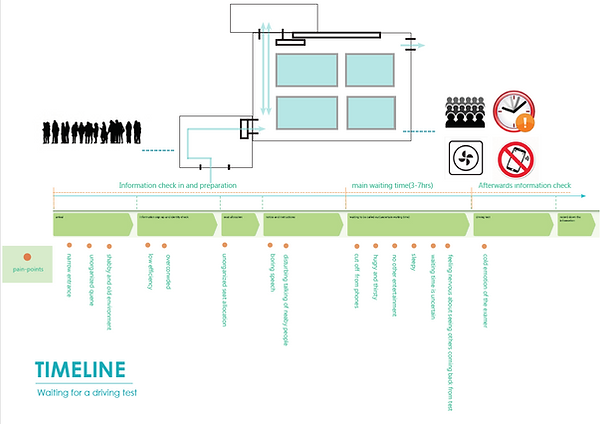
Bad Waiting Experience

.png)
Good Waiting Experience
Mapping Waiting Experience at Train Station


Movie & Game Audience Experience Analysis


THE QUAD ENCOURAGES EXPLORATION TO BUILD COMMUNITY SPIRIT
User Journey
Circulation in Virtual Space

How students and users enter, navigate and interact in The Quad
1. The circulation starts at the top of our weenie. The user spawns at a birdseye view looking downwards to see the multi-dimensional community as well as view the entirety of the Quad in one perspective point.
2. The user is then transported to the centre point area. Markers and signs direct users to explore the Quad's four different wings.
3A. From here users have the option of exploring the exterior of 3A, where they can chat to other orientation students on any flat surface.
3B. Users can also explore the interior of the booths, where they can meet members and sign up for clubs and societies.
Core Values
Using the virtual to enhance the real

The core value is ‘exploration,’ a key part in starting to build or join a community. Our main design goal is for this virtual space to facilitate exploration of opportunities that are usually present at student orientation and encourage interactions to continue outside of our lobby.
See it in Hubs
Enter the Virtual Lobby
Orientation goes online. Explore possibilities to develop university community spirit and sign up for extracurriculars via immersive interactions.
If you have a VR headset, Google Cardboard or even through your internet browser, you can join and explore the lobby prototype space in a social VR setting. Follow the TOUR UI to learn how to navigate or read the Mozilla Hubs tutorial here.
You can use the WASD buttons to move and Q and E buttons to rotate your view. Press spacebar and click to share emoticons or find locations to teleport to.
Gallery
Enter the Virtual Lobby


Concept Development
Diagrams, Elevation, Concept Drawings etc.
Parametric Form Diagram


Quadrant
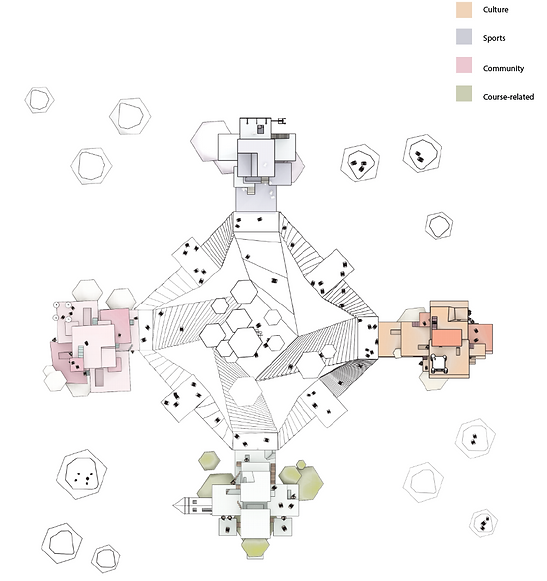
The plan view was inspired by the feeling of endlessness.
In the plan view, the space is divided in the positive and negative x/y axis and is does not indicate any movement in the z axis.
Multi-Gravity

Cubic infrastructure houses booths to support the different student activities and clubs while the use of multi-gravity symbolises the different facets of university life and the individual.
Audience and Values

Breakdown of our target audience
Values the Quad needs to deliver to our target group.

Section and Booths
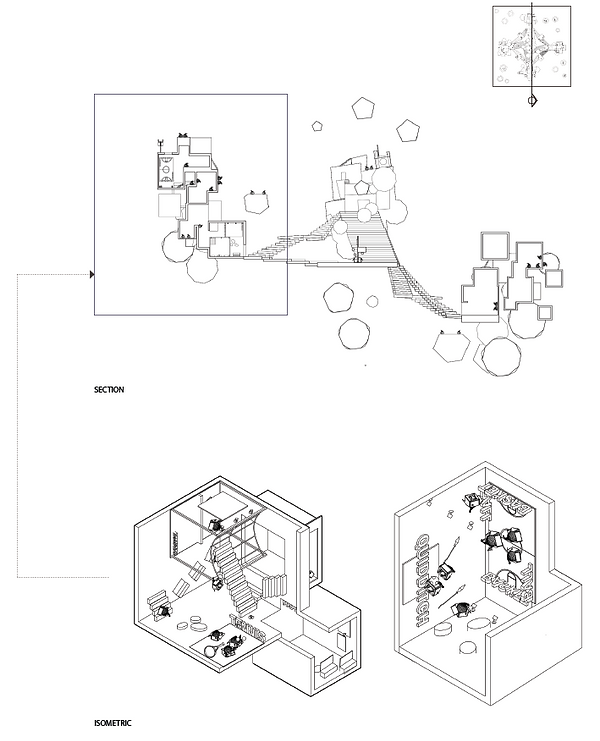
Illustrates the illusion that each box is it's own room on the exterior and start to introduce our multi-gravity environment internally.
Taking anecdotes from stage sets. Scale, orientation and lighting are used to inspire users to come and engage with the societies in ways that are not possible to experience in person. This mult-gravity booth format allows for several clubs to inhabit the same area on different planes.
Detailed Design

The centre axis is emphasised by the domed sculptures in the centre. This also acts as weenie for users who are lost or dis-orientated by the multi-gravity, encouraging them to move to the centre area in order to re-orient themselves. This strategy is akin to the Disneyland castle which helps orient guests throughout the park. We also include some architectural Easter eggs by inserting elements from Melbourne university in the architectural design.
Avatars and Custermerization


To customise the experience, the avatar has an antenna which changes colour according to how much they would like to socialise.
Users can customise their cardboard box to display features about themselves and can also draw onto other avatars with the student's permission. This facilitates a more user-to-user connected experience.
Diverse User Options

The spaces are designed to be available for different types of exchanges, such as social exchange, information exchange or commercial exchange, which enlarges their
roles as a 'melting-point' between people's social activities.
A wide range of activities can be taken within the space, including selling second hand books, looking for an accommodation, finding a job etc.
In the space, users can also take photos together, send emojis, share their screen, or video times based on their choice. It covers all the functions from the typical meeting space but rather has more freedom and is more diverse in terms of interactions and activities.


